About Points and Wallets
In Cloud Bouquet, you can use login servers and compute servers at any time by consuming points.
This section describes an overview of points and wallets, and how points are consumed when using each server.
1. What are Points?
In Cloud Bouquet, you can use login servers and compute servers with different purposes and performance by specifying your desired time slots.
Each server has a point price set according to its specifications and usage time.
Administrators and users can use these servers by consuming points that have been granted in advance.
2. How to Obtain Points and Their Expiration
Points are granted by our company based on your order. For orders and inquiries, please contact our sales representative or Contact Information.
NOTICE!
- In principle, points have an expiration date of 180 days from the date of grant.
- Expiration dates may vary depending on certain promotions.
- Please note that points will automatically expire and cannot be used after the expiration date.
- For expiry of points, please refer to Point Expiration (for Administrators).
3. Wallets and Point Transfer
The following chart explains how points are handled after they are awarded.
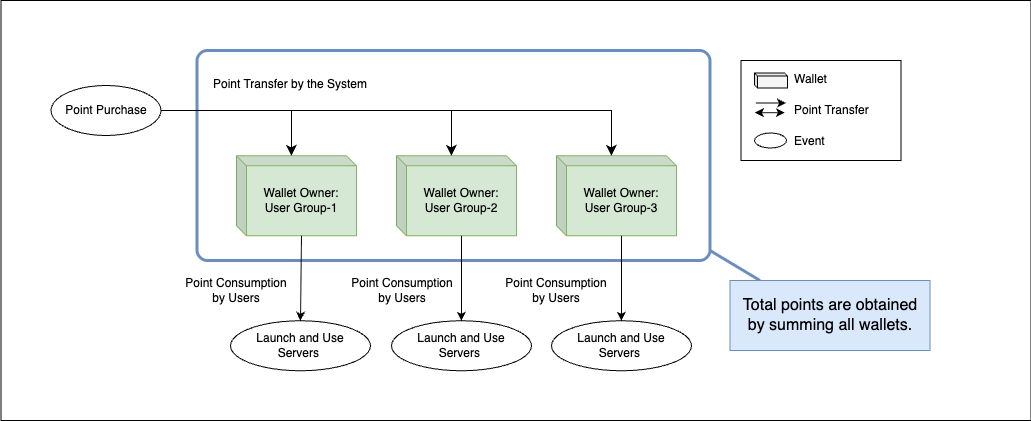
Points are managed per wallet. A wallet is a unit for storing and managing points.
Wallets exist as 「user group wallets」 created for each user group.
User group wallets are created automatically when a user group is created.
In the initial state, a user group named 「default」 and its wallet are created automatically.
(For user group settings, please refer to How to Register Users (for Administrators).)
All granted points are deposited into a user group wallet (such as 「default」).
Administrators can move points between any user group wallets. Note that only administrators can perform point transfers; users cannot.
Points held in each user group wallet can be used by administrators or users belonging to that group when utilizing login servers or compute servers.
As each server is used, points in the corresponding user group wallet are debited(consumed).
In this way, various server services can be utilized through point transfer and management using wallets.
TIPS!
More detailed operating conditions for the above flow and point handling are as follows
- The number of points required for each server reservation can be checked during server selection and setup.(How to use Compute Server)
- It is not possible to transfer points exceeding the balance of the source wallet.
- Users cannot reserve servers using points from wallets they do not belong to.
- If points with different expiration dates are included, points with earlier expiration dates will be consumed first.
- The total points in each wallet constitute the total owned points.
4. Using Each Server and Points
This section explains the flow of point consumption when using login servers and compute servers.
For specific operating procedures, please refer to How to use Compute Server.
4.1. Compute Server Reservation
This section describes the conditions and overview of operations required for compute server reservation, and the point consumption that occurs upon reservation completion.
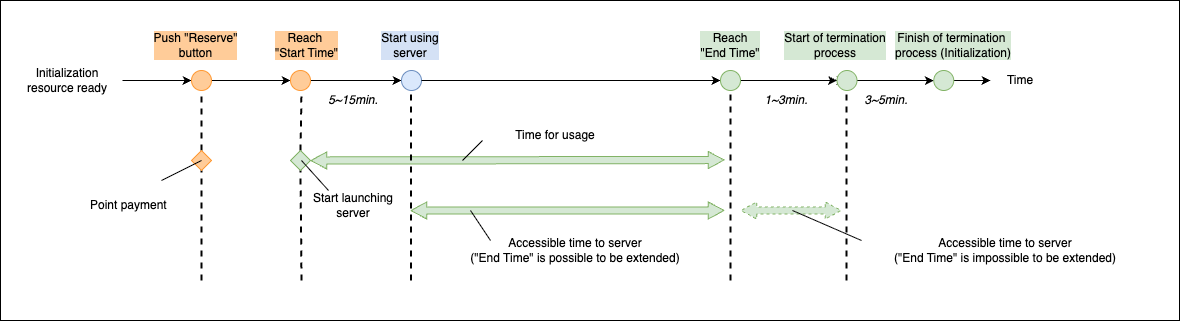
A reservation is required to use a compute server. Upon completion of the reservation, points are consumed according to the compute server’s specifications and estimated usage time.
For specific operating procedures, please refer to Compute Server Reservation, and for reservation confirmation methods, refer to Compute Server Reservation Confirmation.
TIPS!
- Compute servers can be reserved for a period from the current month until the end of two months later.
- Depending on other reservation statuses, it may not be possible to reserve a compute server with your desired specifications and period.
- When reserving a compute server, if the point balance of the user group is less than the required points, the compute server cannot be reserved.
- Point consumption according to estimated usage time is executed in 1-hour increments.
- Usage time is counted as 1 hour for every 3600 seconds, with fractions rounded up.(e.g., 1 to 3600 seconds is counted as 1 hour, 3601 to 7200 seconds is counted as 2 hours)
- The counted time and consumed points can be confirmed during the reservation process.
4.2. Compute Server Reservation Cancellation
This section describes the conditions under which a reserved compute server can be canceled and the flow of point refunds that occur upon cancellation.
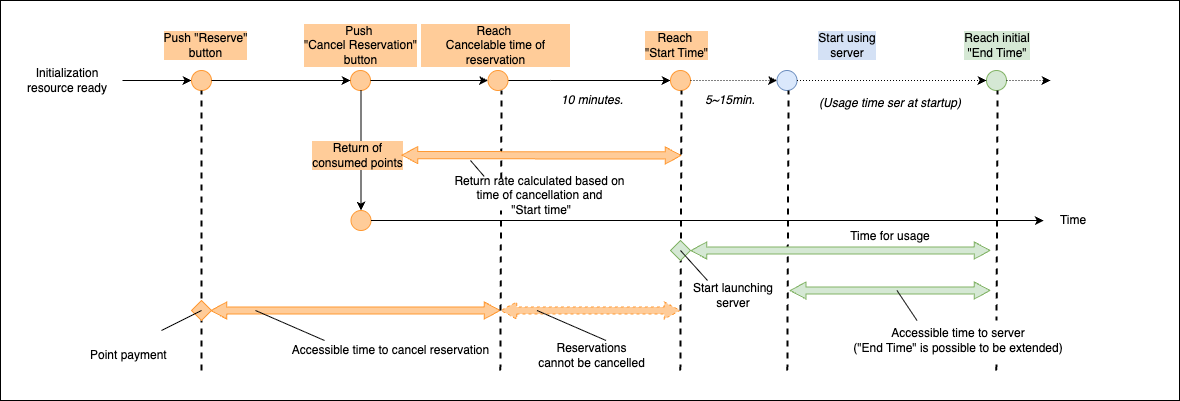
If the use of a compute server becomes unnecessary, you can cancel the reservation.
When a cancellation is executed, the reservation is canceled, and a portion of the points that were scheduled to be used will be refunded.
The number of points refunded is calculated based on the server specifications at the time of reservation and the scheduled start time, among other factors.
For details on point refund rules, please refer to Point Refunds.
TIPS!
- Compute server reservations can be canceled up to 10 minutes before the scheduled start time.
- The point refund rate applied is based on the settings at the time of reservation.
4.3. Changing Compute Server Reservation Time
This section describes the conditions under which reservation times can be changed, and how points are handled in conjunction with such changes.
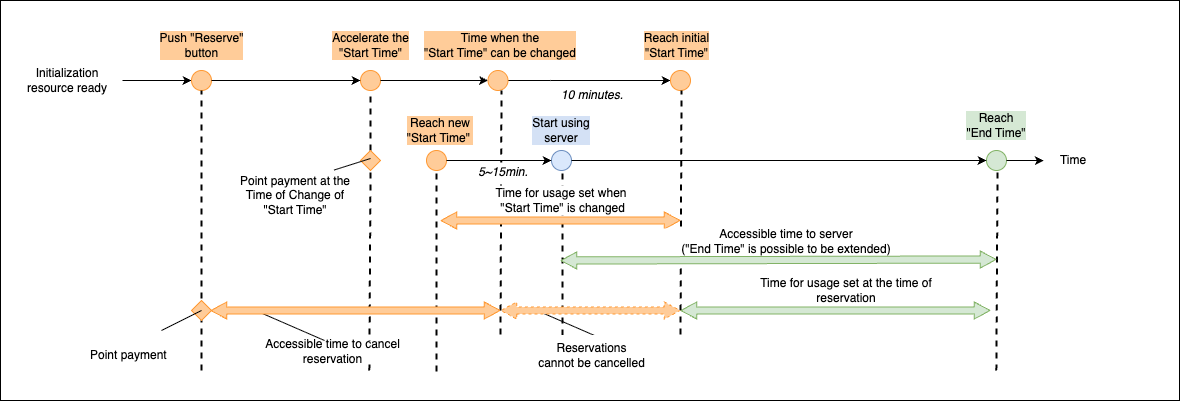
It is possible to change the scheduled start time and scheduled end time for a reserved compute server.
In either case, points will be consumed according to the newly added estimated usage time.
TIPS!
- Reservation time changes can be executed up to 1 hour before the scheduled start time.
- This function only covers time changes and does not allow for changes to the compute server’s specifications.
- Depending on the reservation status before and after the reserved compute server, extension may not be possible.
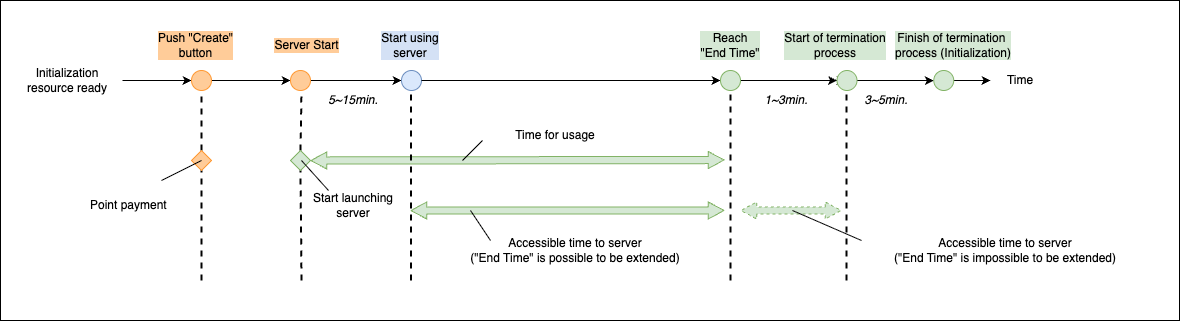
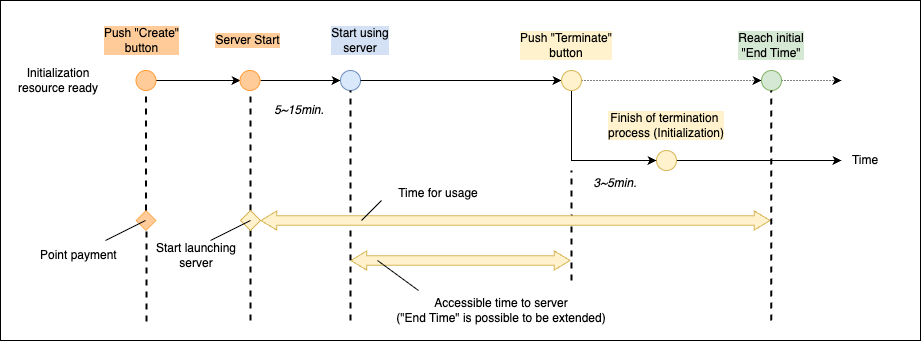
4.4. Server Startup and Termination
This section describes the flow from startup to termination of each server(login server and compute server) and the associated point consumption.
Login servers begin use by setting specifications and a scheduled end time during startup and then executing the startup operation.
Compute servers automatically start up at the configured scheduled start time after a prior reservation.
In either case, points are consumed according to the server’s specifications and estimated usage time(time from startup to termination).
Point consumption occurs at login server startup and upon compute server reservation completion.
Once the startup process(usually about 5-15 minutes)is complete, the server can be used until the configured scheduled end time.
When the scheduled end time is reached, the termination process automatically begins, and all data and environments on the server are destroyed, making it inaccessible.
TIPS!
- When the scheduled end time is reached, the termination process automatically begins after a processing wait time of about 1-3 minutes.
- During the processing wait time, operations can still be performed, but the scheduled end time cannot be extended.
NOTICE!
When the termination process starts, the configuration environment and all stored data for the login server in question will be deleted.
Be sure to confirm in advance whether or not a backup is required.
4.5. Extending Server Usage Time
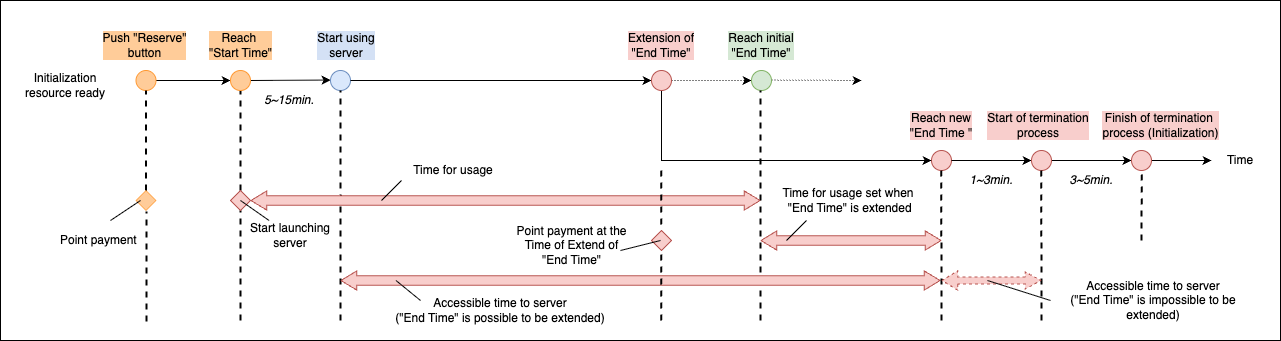
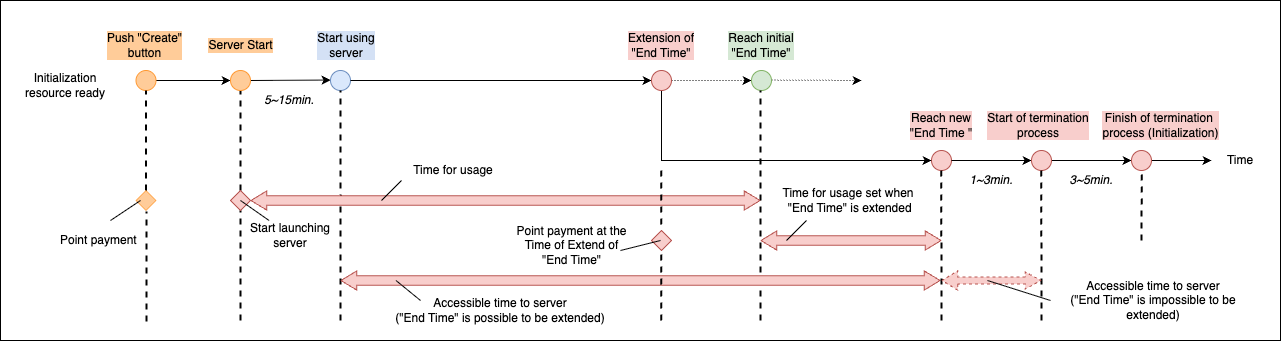
This section describes the conditions for extending the scheduled end time for a server in use, and the flow of point consumption associated with the extension.
Each server can have its usage time extended by prolonging the scheduled end time while in use. This extension operation consumes points according to the newly added time.
After the extension, the server can be used until the updated scheduled end time. The termination process automatically occurs after the new scheduled end time is reached.
TIPS!
- The operation to extend the scheduled end time can be executed for servers currently in use.
- The extendable scheduled end time can only be a time after the currently set scheduled end time.
- The specifications of each server cannot be changed through the extension operation.
- If the user group’s point balance falls below the required points when extending the scheduled end time, the extension operation cannot be performed.
- Extensions can be executed multiple times, but if there are subsequent reservations, the extension is limited to the start time of those reservations.
- Point consumption due to extension is also executed in 1-hour increments.
- Usage time is counted as 1 hour for every 3600 seconds, with fractions rounded up.
(e.g., 1 to 3600 seconds is counted as 1 hour, 3601 to 7200 seconds is counted as 2 hours)- The counted time and consumed points can be confirmed during the extension operation process.
4.6. Early Server Termination
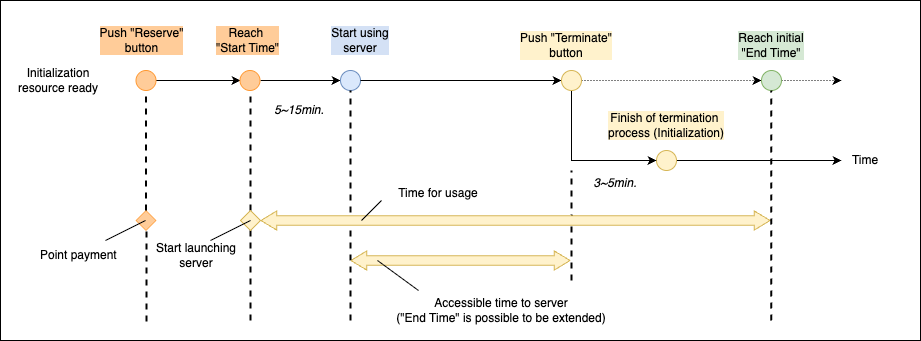
This section explains point refunds when terminating server usage earlier than scheduled.
For a server currently in use, you can immediately execute a termination operation without waiting for the scheduled end time. At this time, a portion of the points consumed at the time of reservation will be refunded, depending on the used time and its relation to the set scheduled end time.
For specific operating procedures, please refer to Termination of Compute Server. (the same operation can be used to terminate login servers)
TIPS!
- The early termination operation can only be executed for servers currently in use.
- Points refunded by early termination are calculated based on the refund rate set at the time of reservation.
- Details of the points to be refunded can be confirmed during the operation.
- Executing early termination will discard all data and environmental settings saved on each server.