Point Refunds
Points consumed may be refunded due to server reservation cancellation or early termination.
This section explains the conditions under which points are refunded and how to check refund details.
1. About point refunds
In Cloud Bouquet, consumed points are refunded under the following conditions:
- When a compute server reservation is canceled
- When a login server or compute server in use is terminated early
The number of points refunded is calculated by applying the refund rate specified in the Terms of Use to the points consumed at the time of reservation.
The refund rate varies depending on the following factors:
- The specifications of each server (GPU model)
- The timing of the reservation cancellation or early termination
For specific refund rates, please refer to Appendix 1 of the Terms of Use.
TIPS!
Please note the following regarding point refunds:
- The expiration date of the refunded points will be the same as the expiration date of the points consumed at the time of reservation.
- If the refunded points include decimals, rounding up will be applied.
Example: If 30.2 points result from the application of the refund rate, 31 points will be refunded.
2. Point Refund Example
Example
- Compute server reserved 10 days in advance
- Plan: 30 points per hour
- Reserved time: 5 hours
- Points consumed: 150 points
- Cancellation occurred before the scheduled start time
In this case, a portion or all of the points will be refunded. The number of points refunded varies depending on the date and time the cancellation is executed.
Actual refund rates vary depending on the compute server’s specifications. Please refer to Appendix 1 of the Terms of Use for detailed refund rates.
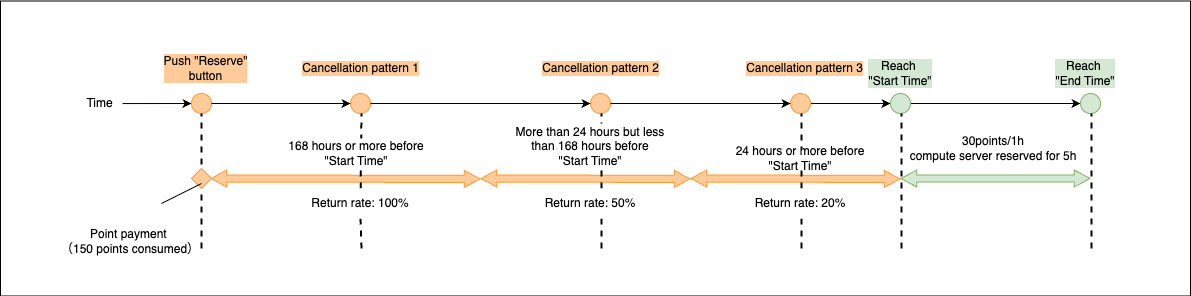
| Cancellation Timing | Refund Rate | Points Consumed | Points Refunded |
|---|---|---|---|
| (1) 168 hours or more before scheduled start time | 100% | 150 | 150 |
| (2) 24 hours or more but less than 168 hours before scheduled start time | 50% | 150 | 75 |
| (3) Less than 24 hours before scheduled start time | 20% | 150 | 30 |
TIPS!
- For the procedure to cancel a reserved compute server, please refer to How to use Compute Server.
- For the early termination procedure for each server, please refer to How to use Compute Server.